Samsung dryers with electronic displays often flag heat-related faults with a specific code rather than leaving you to guess, which narrows the diagnosis considerably compared to older mechanical-timer dryers. The heating element itself is accessed from the front on most models, after the drum is removed.
We assume you’ve already been through our full Dryer Not Heating guide, since it lays out every cause in the order worth checking. From here on, it’s all about Samsung’s own error codes and how you get to the parts, and it sits inside our broader dryer troubleshooting hub.
Samsung Reset Procedure
Unplug the dryer for 1 minute, or press and hold Start/Pause for 3 seconds on models with that option, to power-cycle the control board. Many Samsung models also have a Self Check or Smart Care diagnostic mode accessible through the touch panel, which can help confirm whether a fault code is still active after a reset.
Where the Heating Element and Sensor Are
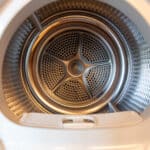
On most Samsung dryers, the heating element is accessed from the front after removing the drum, rather than from the back panel like many competitors. The temperature and moisture sensors sit inside the drum itself, typically as small metal strips, and a coating of fabric softener residue on them can trigger false readings that look like a heat problem.
Error Codes You Might See
“tE” generally points to a temperature sensor fault, and “AE” to an airflow or auto-sensing issue, both of which can present as a dryer that runs cool or takes far longer than normal rather than showing zero heat outright. Always confirm the exact meaning against your specific model’s use and care guide, since Samsung reuses similar-looking codes across different appliance lines.
What Trips People Up on Samsung Units
Front-access element service on Samsung dryers usually means removing the drum, which is a bigger job than the back-panel access common on other brands, so factor in extra time even for a part that’s inexpensive on its own. Dirty in-drum sensors are a genuinely common and easy fix that’s worth checking before any parts are ordered.
Frequently Asked Questions
What does a tE code mean on a Samsung dryer?
It generally indicates a temperature sensor fault. Before replacing the sensor, try cleaning the small metal sensor strips inside the drum, since residue buildup is a common cause of false readings.
Why does my Samsung dryer take the drum off to reach the heating element?
Samsung's design routes access to the element from the front of the cabinet on most models, which requires removing the drum, unlike brands that access it from the back panel.
Does Samsung have a self-diagnostic mode?
Many models include a Self Check or Smart Care function accessible through the control panel, which can help confirm whether an error code is a real fault or a one-time glitch.
None of this replaces an in-person assessment from a qualified repair professional; it’s meant to point you in the right direction.