On Samsung refrigerators, it’s common for the freezer to stay perfectly cold while the fresh food section warms up, and the reason is architectural: Samsung’s Twin Cooling Plus system uses two separate evaporators and fans sharing one compressor, so a fault on the fridge side doesn’t touch the freezer at all.
If you haven’t yet, read through our Refrigerator Not Cooling guide, it covers every general cause in the right diagnostic order. What follows is specific to Samsung units. This page also sits inside our larger refrigerator troubleshooting hub.
Check for Cooling Off / Demo Mode First
If the display shows “OF OF,” “O FF,” or scrolling temperature bars instead of a normal reading, the fridge is in Cooling Off Mode, also called Demo or Shop Mode, a retail setting that leaves lights working but disables cooling. Exiting it is model-specific, so check your manual before assuming a hardware fault.
Ice Buildup on the Fresh-Food Evaporator
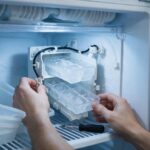
On Twin Cooling models, the most common cause of a warm fridge with a cold freezer is frost building up on the fresh-food side evaporator coil, usually from a door that doesn’t seal or a defrost heater that isn’t cycling. It restricts airflow to the fridge compartment specifically, even though the freezer’s separate system keeps running normally.
Power Reset and Error Codes
Power-cycle the refrigerator by unplugging it or switching off the breaker for about 2 minutes. As it restarts, Samsung’s control board runs a self-test and will display an error code if it detects a sensor or fan fault, which is worth photographing and looking up by exact model number on Samsung’s support site.
Frequently Asked Questions
Why is my Samsung freezer cold but the fridge section warm?
Samsung's Twin Cooling Plus design uses a separate evaporator and fan for each compartment off one shared compressor, so a blockage or fan failure on the fridge side doesn't affect the freezer.
What does "OF OF" or scrolling bars on the display mean?
That's Samsung's Cooling Off (Demo/Shop) mode, a display setting that disables cooling while keeping the interior light on. It needs to be exited manually; the sequence depends on your model.
How do I check for ice buildup on the evaporator?
It's usually behind a rear panel inside the fridge compartment and isn't a routine DIY check on most models. If the door seal and vents check out and the fridge still won't cool, ice buildup on the evaporator is the next likely cause a technician would look for.
What should I do with a Samsung error code after a reset?
Photograph it, note your exact model number, and search Samsung's support site for that specific code. Codes on Samsung fridges usually point to a sensor, fan, or communication fault rather than telling you to replace a specific part yourself.
This is a starting point for diagnosis, not a replacement for a qualified technician.